“Touch Resolume” 0.9 BETA – Custom TouchOSC Layout for Resolume 3.1

Touch Resolume 0.9.9.1 BETA

Download Latest Custom TouchOSC Layout and OSCulator patch here:  Touch-Resolume-0.9.9.1-Beta

What is it?
“Touch Resolume” is a custom layout for TouchOSC that allows you to control Resolume 3.1 over a wireless network directly with your iphone, ipod touch, or ipad WITHOUT midi mapping, just load the software and start controlling dozens of functions in  Resolume,  no mapping required.. Touch Resolume controls Resolume 3.1 directly with OSC commands translated with OSCulator. This is a mac only layout (at the moment) .  using this layout directly with resolume without OSCulator will work, but only about half of the functions are available. (see details below)

Release Notes:
New updated version 0.9.9.1 released today: October 5th 2009.
update includes: now works with both audio and video clips,  new crossfader and video scratch page, fixed beatloopr buttons, and better color identification for layers.

What do I need to use this?
Resolume 3.1 – 3.1.2 (mac or pc)
(does not work with Resolume 3.1.3 or 3.2) Update coming soon.
TouchOSC 1.4 for iphone or ipod touch
TouchOSC Editor 1.1 (used to upload custom layout to iphone/ipod)
OSCulator 2.8 (mac only)

Do I need I really need a mac?
It is possible to use this custom layout for TouchOSC directly with Resolume on a PC, however not all of the pages will work.  TouchOSC only sends values of 0 to 1 and does not allow for custom values.  Since Resolume 3 sometimes requires values of 2,3,4 etc for things like the beatloopr or directional controls… OSCulator (mac only) is need to translates the information into a command Resolume understands.  It is possible to use software like MAX/MSP, Processing or PureData to convert the OSC values, but I do not have the programing knowledge required to do this.  If anyone is interested a patch that would be much appreciated.  There are already patches created for other TouchOSC layouts, that could be modified.

What can I control with this layout:
Touch Resolume 0.9.9.1 BETA has 5 pages each with a unique set of controls.
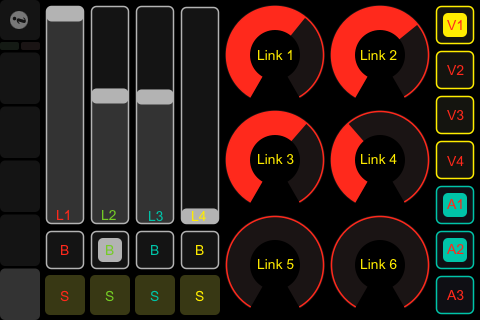
Page 1 – Composition Mix
Touch Resolume Page 1
This layout controls the first 4 layers: audio&video slider, bypass, solo, 6 dashboard link controls as well as video and audio effect bypass switches.

Note: works directly with Resolume (pc or mac)  no  translation required!

Page 2 – Loop and Cue (active layer)
Touch Resolume Page 2
Control the active clip on layers 1 through 4.  beatloopr, transport controls, direction, playmode, timeline mode (BPM or Timeline) and  cuepoints (only the first cue point works due to some OSC issues in Resolume 3, should be fixed in the next release of Resolume)
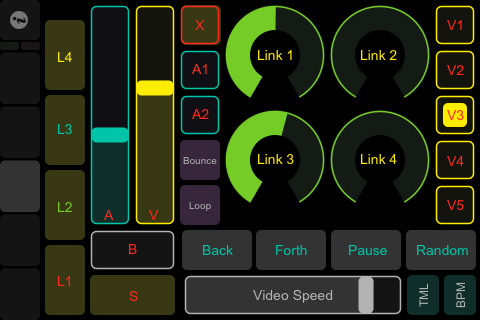
Page 3 – Layer effects and mix (active layer)
Touch Resolume Page 3
Controls the active layer 1 through 4.  timelinemode, opacity, audio, bypass, solo, playdirection, video speed, layer audio and video effect bypass, and layer dashboard controls 1 through 4.
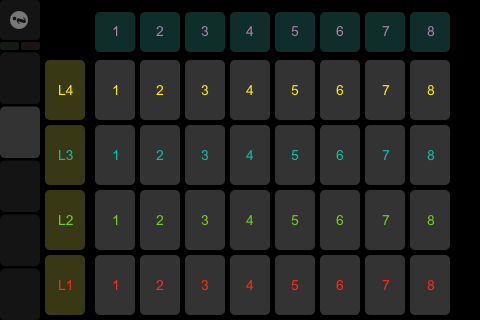
Page 4 – Trigger Clip
Touch Resolume Page 4
This page triggers 8 columns of clips on 4 layers.

Note: works direct with Resolume (pc or mac) no translation require!

Page 5 – Cross Fader and Scratch Controls

Touch Resolume Page 5
Add each layer to the A or B cross fader, and start mixing.  Scratch video, and change blend modes!  The blend mode selector is not working at the moment, again strange OSC behavior in Resolume.

Why is this a BETA release?
This version of the layout has a few features that are not fully functioning.  (cue points and blend mode selection, these appear to be issues with Resolume itself and I hope they will be fixed in future releases)  Let me know if you have any workarounds of these problems.

How do I install  and use this layout?

1. First download and install all software needed from these websites, all the software is available as a demo for testing except TouchOSC (it only costs a few buck).

Resolume 3.1 (version 3.0 does not have a combined audio/video slider)
TouchOSC 1.4
TouchOSC Editor 1.1
OSCulator 2.8

and don’t forget my custom Layout and Patch: Touch-Resolume-0.9.9.1-Beta

2a.  Launch the TouchOSC editor and open the custom layout “Touch Resolume 0.9.9.1 Beta.touchosc”
Then click the sync button in the editor.

2b  open TouchOSC on your iphone/ipod (make sure you are connected to the same wireless network as your computer)  Then choose layout then Add>  TouchOSC should find your computer as long as you have pressed the sync button.  after the layout is download make sure you select it to continue

2c  Make sure TouchOSC outgoing port is set to 8000 the default for OSCulator (set to 7000 for direct communication with Resolume)

3.  Launch OSCulator and open the custom patch “Touch Resolume 0.9.9.1 Beta”  This software must be running on the same computer as Resolume.  the patch is configured to send to the localhost: on port 7000.  If your want to route the signal to another computer you have to change all the send values to a new IP address.  lots of work.

4.  Launch Resolume 3.1 and make sure you have OSC turned on in the preferences.  Make sure bundles is NOT checked.  and the incoming port is set to 7000

5. have fun!

Posted: September 25th, 2009
at 6:49pm by Martin Thoburn

Tagged with , , , , , , ,


Categories: VJ - Realtime Video Mixing

Comments: 16 comments


16 Responses to '“Touch Resolume” 0.9 BETA – Custom TouchOSC Layout for Resolume 3.1'

Subscribe to comments with RSS or TrackBack to '“Touch Resolume” 0.9 BETA – Custom TouchOSC Layout for Resolume 3.1'.

  1. Hey Martin,

    Great work here!
    I can give you a solution for the problem you are describing. I don’t have Resolume, so it may need a bit of trial and error, but I’m pretty sure it’s what you need. Just drop me an email!

    Best,
    Cam

    Camille

    26 Sep 09 at 11:10 am


  2. [...] Touch Resolume 0.8 BETA – Custom TouchOSC Layout at martin-thoburn.com. Possibly related posts: (automatically generated)iPhone/iPod touch debrickification [...]


  3. i use toch osc with resolume 2.4 in pc
    whan you need is a soft that can read osc and can edit thouse values and send it to MIDI
    i use VVVV and MidiBox and it work grat, latter i will check and download this one so i can make the vvvv patch
    check

    http://vimeo.com/2845120
    http://vimeo.com/2903393

    andresc4

    2 Oct 09 at 5:54 am


  4. [...] at the same time, Martin Thoburn was experimenting with controlling video from his iPhone. He’s a media artist, and I really like his work. Here’s a beautiful montage he did for [...]


  5. [...] “Touch Resolume” 0.9 BETA – Custom TouchOSC Layout for Resolume 3.1 [...]


  6. Heyah,

    i am just trying to use this but without the result i expected…

    OSC on iphone and Mac runs well.. okay…
    but not really sure if i have to rename the local host thing…?!?!?
    my mac is called rockstar in the net and he uses his own net to communicate… so on the iphone i used the host called: rockstar.local
    to let it work…
    resolume started.. and al the preferences are done.. but no actions when i use the installed layout…

    hmmm so what am i doing wrong here.. ??

    greetings from Frankfurt Germany..

    A.K. ;)

    Alfred

    10 Dec 09 at 7:13 pm


  7. it worx now… yeah… ;)

    hehe the questions is the awnser in this case.. ;)

    Alfred

    10 Dec 09 at 7:31 pm


  8. [...] нашел еще один интересный layout . Посмотреть можно здесь Hello there! If you are new here, you might want to subscribe to the RSS feed for updates on this [...]


  9. RubenS, great TouchOSC Resolume layout. thanks for sharing the link. Your layout is simple, and elegant. works great, directly with resolume. :-)

    Martin Thoburn

    13 Dec 09 at 2:18 am


  10. is there going to be an ipad layout coming soon. just can’t wait to play with my new controller/ipad.

    Timothy

    23 Apr 10 at 10:48 pm


  11. Timothy,

    I plan on making a new update to his layout that is compatible with Resolume 3.1.3 & 3.2 since the OSC commands have changed. If I have some time I might work on an ipad layout too. using the ipad with touch resolume should be an amazing experience.

    Martin Thoburn

    25 Apr 10 at 5:16 pm


  12. Thank You Martin.

    Timothy

    9 May 10 at 7:14 am


  13. iPad is going to take some work. I made a layout for the ipad with this layout and it did not work. when i put all the commands from OSC on one page i got it to work…somewhat. some of the values where messed up.

    timothy

    22 May 10 at 10:13 pm


  14. hi martin,

    what´s about the version for resolume 3.1.3 & 3.2?

    sincerly, volker

    Volker

    7 Jun 10 at 2:39 pm


  15. I would really love to have a version that will work with Resolume 3.2. This looks like it would be a great tool to use on my VJ sets. Any ETA on an update?

    Adam

    7 Jun 10 at 11:48 pm


  16. adam,

    Yes, a 3.2 update is long overdue. I got alot going on these days, I’ll try to have an update in the next month.

    Martin Thoburn

    8 Jun 10 at 2:18 am


Leave a Reply